ProfiLab
← ProjectsOur own product

Hourgrid — the system for venues that sell an hour

Film and photo studios, halls and meeting rooms, coworking spaces, rehearsal rooms, treatment rooms. Schedule, bookings, money, clients and staff in one place — plus a public page where guests pick a free hour themselves.

  • Next.js 16 · TypeScript
  • Supabase · PostgreSQL · RLS
  • Stripe · subscriptions and Connect
  • Anthropic SDK · Groq
  • 3 languages

By the numbers

5roles enforced in the database, not in the markup
3interface languages: English, Russian, Spanish
16sections in the app, plus public pages
41database tables, 84 migrations

The problem

A venue that sells an hour runs on a shared calendar and a spreadsheet with the price list. While one person takes the bookings, it works; the moment there are two, two bookings land on the same room at the same time — and nobody notices until the day of the shoot. Evening rates and overtime get worked out in someone's head and never invoiced, enquiries scatter across WhatsApp, Instagram and email, and the link to the spreadsheet with phone numbers and amounts is visible to everyone it was ever forwarded to. A mistake here costs you the room, not just time: a double booking is a cancelled shooting day.

What it does

A schedule where two bookings cannot overlap

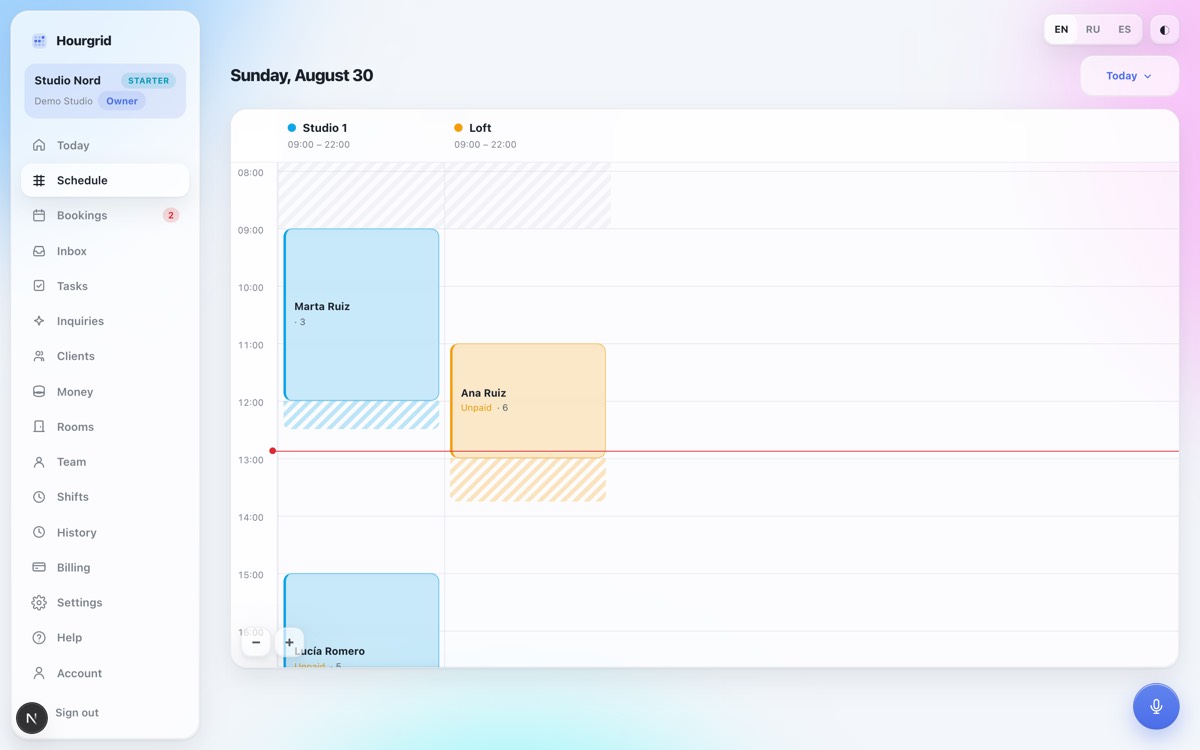
Day and week views: hours down the side, rooms or days as columns, a line marking the current moment. Overlaps are blocked by the database itself — by a range constraint, not a check in the form: a second simultaneous request slips straight past a check like that. The cleaning buffer counts as occupied time, an enquiry holds the slot, cancelling releases it.

A public booking page

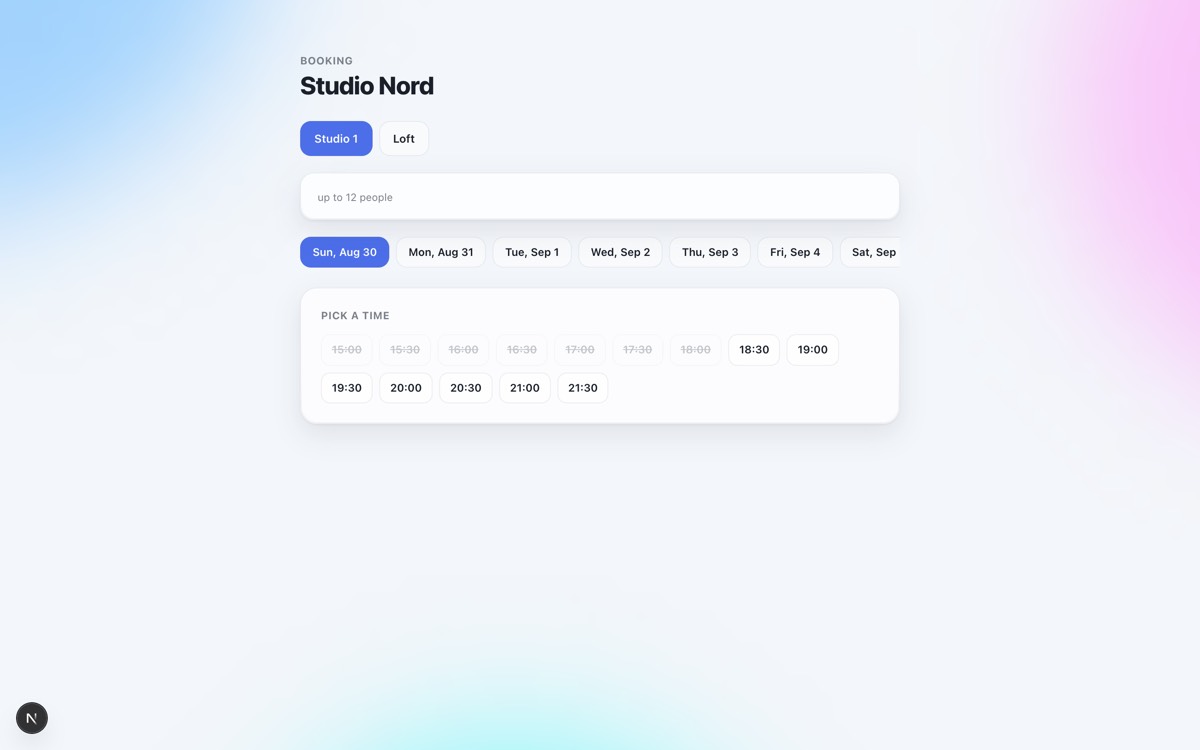
At the venue's own address, anyone without an account picks a room, a day and an hour, sees booked slots struck through, and sends an enquiry. The server prices it by the venue's own rules, availability is returned without guest names, and traffic is capped. Eighteen checks were run from an outsider's position: what the response contains, refusals on overlaps, opening hours, booking horizon, attempts to reach the tables directly.

Pricing that follows the time of day

55 + 55 + 90 = 200, when the third hour falls into the evening rate: the total is assembled segment by segment, not multiplied by a single rate. Overtime is calculated with a multiplier and rounded in blocks, the deposit and the damage bond sit in separate fields, cancellation rules are defined in tiers. The guest's agreement to the terms is stored as a snapshot of the text — any dispute will be about what the person actually agreed to at the time.

Capture: a photo, a document or a voice note becomes a draft

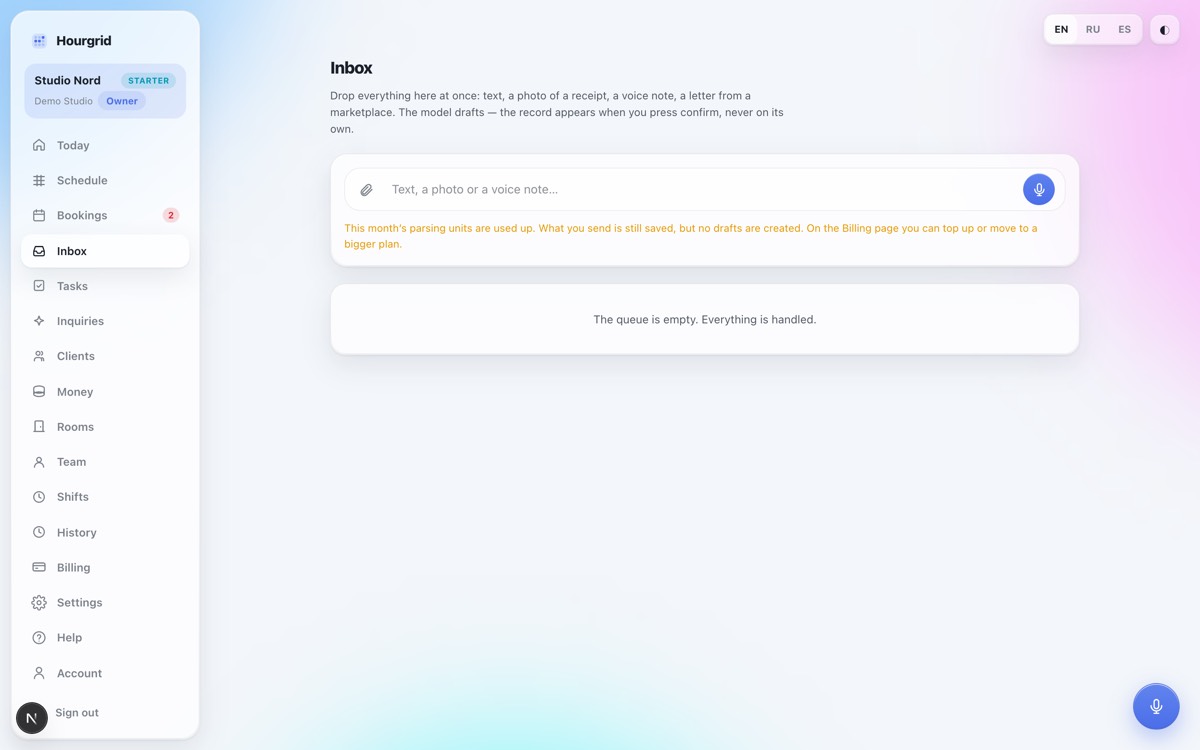
Send text, a photo of a receipt, a PDF or a voice note. The parser proposes drafts of five kinds — booking, transaction, task, enquiry, client — plus separate line items for extra services with amounts. The model never writes anything itself: a person creates the record with a tap, so a misread costs one "discard". Parsing runs on the server, so a backgrounded app or a dropped connection doesn't interrupt it.

Money that cannot be counted twice

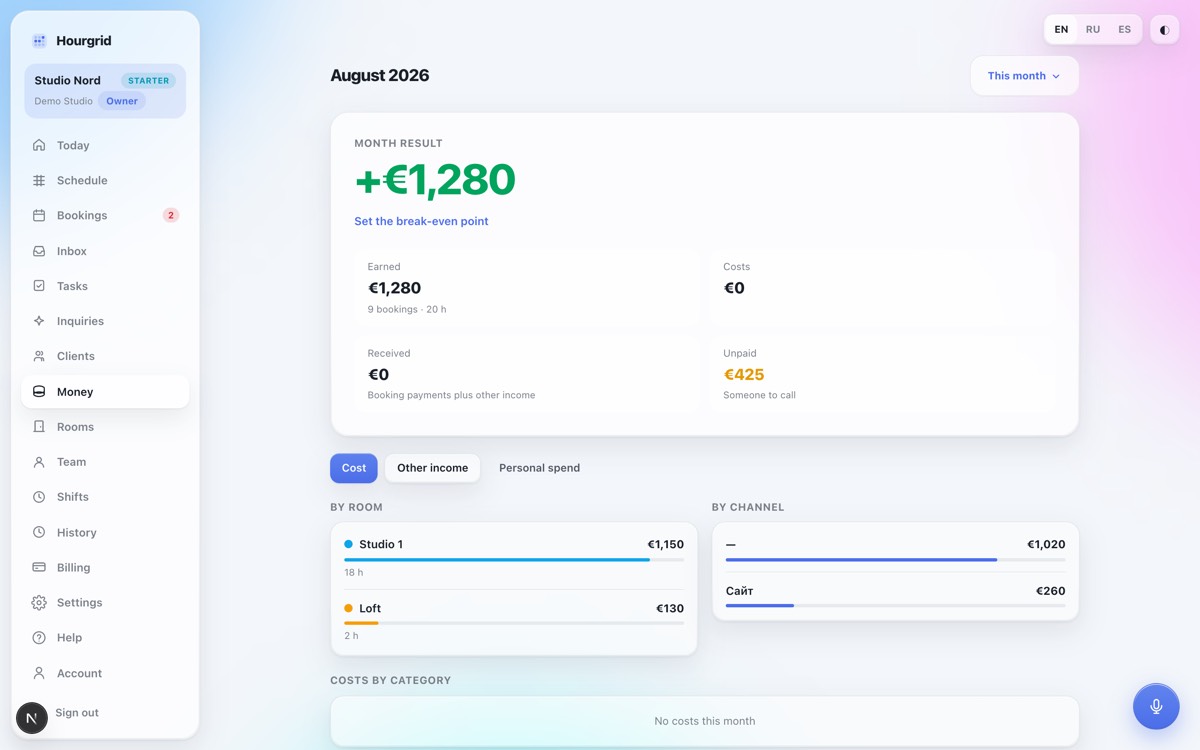
Booking totals are generated database columns — they cannot be added up wrongly in code; the paid amount is recalculated by a trigger from the payment history rather than stored in a field of its own. An income transaction cannot reference a booking — otherwise one payment would land in the month twice. A list of the month's operations, breakdowns by room, channel and category, a break-even threshold; month boundaries are calculated in the venue's time zone, not in UTC.

A client base that doesn't flatter you

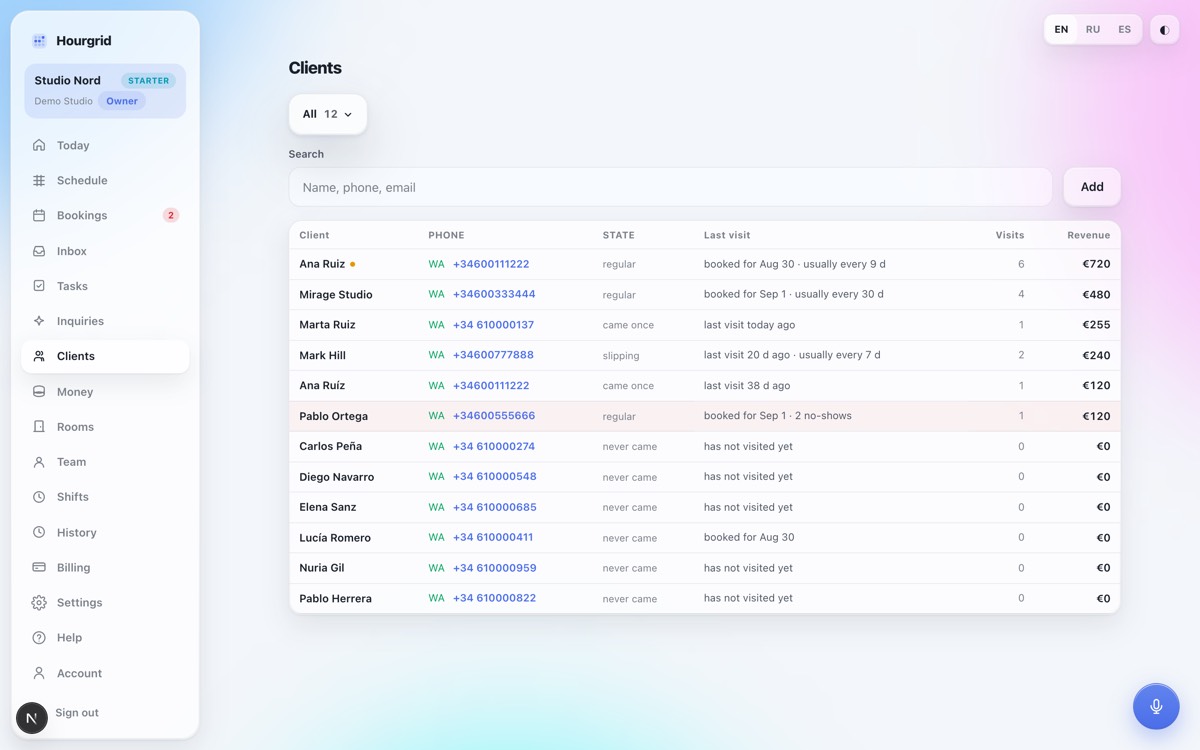
Segments: all, regulars, lapsing, at risk, duplicates. "Lapsed" is measured against each client's own rhythm: someone who comes weekly has lapsed after three quiet weeks, someone who comes quarterly has not. Duplicates are found by similarity score: a matching phone number is 100%, a one-letter spelling variant is 95%, different surnames with a common start fall below the threshold. Without this, one person's revenue is split across two records.

Five roles enforced in the database

Owner, manager, front desk, accountant, staff member. A staff member doesn't merely "not see" the money — it never reaches them: the policies on bookings, clients and transactions require a role, and their own schedule comes from a function that physically has no money columns in it. The owner's personal spending stays invisible even to the manager querying directly. Permissions were tested with requests made under real tokens, not by reading the policies.

Enquiries and first-response time

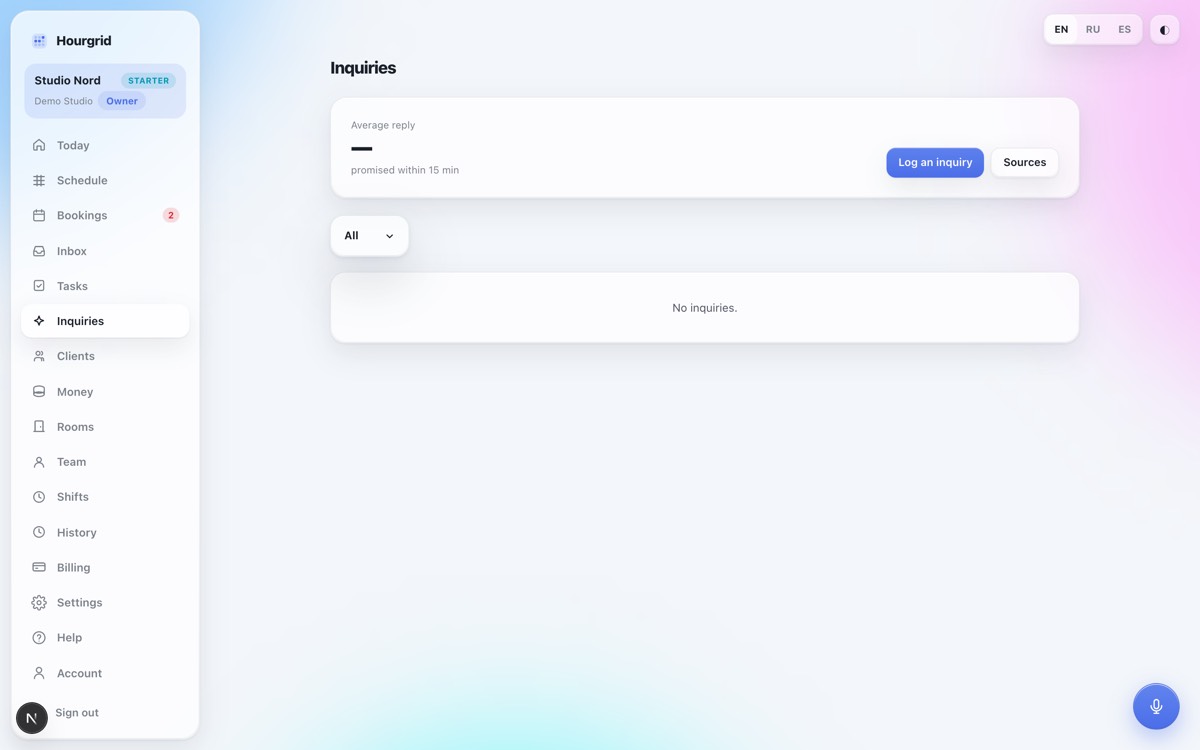
Enquiries arrive through a channel link — a form on the website, Tilda, Make, Zapier — and through the venue's own Telegram bot: the owner's bot, not a shared one. The system records the moment of the first reply and measures it against the venue's own target. The AI front desk can offer a free slot and take the person through to an enquiry the same way the public page does; every machine-written reply is marked as such.

Staff, tasks and shifts

Invitations by link, not by email: the token reveals only the venue name and the role, and the link works once. Tasks sort by urgency, the assignee moves the status and writes the next step. Shifts are a weekly people-by-days grid with the name column pinned; the rate is copied into the shift as a snapshot, so raising it doesn't rewrite past months.
Screens

The screenshots use demo data: the names, amounts and bookings are invented. We will not put a real venue schedule on display, because those are other people clients and other people money. The interface switches between English, Russian and Spanish.

Hour, room, client — a day grid instead of the paper log on the front desk
A forwarded voice note becomes a booking draft — original alongside, everything still editable
The month in a single number: revenue, costs, debts and the break-even point
Average response time to an enquiry — a figure nobody was measuring before
The database itself flags who hasn't been back in a while and who is at risk
The public booking page: guests pick a free hour themselves — no calls, no back-and-forth

What it replaces

On the left, how most small venues run a room schedule today. On the right, the same thing in one system.

How it works now

A spreadsheet and a chat

costs nothing right up until the first double booking

  • A shared calendar and an understanding that you "ask in the chat first"
  • The price list in someone's head, evening rates and overtime worked out by hand
  • Enquiries in WhatsApp, Instagram and email, with nobody tracking response time
  • The spreadsheet link is visible to everyone it was forwarded to
  • In the evening, all of it gets copied into the spreadsheet again

Hourgrid

One subscription

sign up yourself, demo data included, nothing to configure by hand

  • Schedule, bookings, money, clients and staff in one place
  • A public booking page at the venue's own address
  • Time-of-day pricing, overtime and deposits calculated by the server
  • Five roles enforced row by row in the database
  • Photos, PDFs and voice notes turn into draft records

We do not quote a price on this page: it changes, and the current one is always on the product site.

How this differs from a spreadsheet and a shared calendar

Calendar and spreadsheetHourgrid
Two people, one roomTwo front-desk staff enter bookings at the same time; the clash surfaces on the day of the shootOverlaps are blocked by a database constraint, cleaning buffer included; an enquiry holds the slot, cancelling releases it
Evening and weekend ratesThe price list lives in someone's head or a spreadsheet; evening rates and overtime are worked out by hand and forgotten at invoicingTime-based pricing rules, overtime with a multiplier and rounding, add-on services — the server assembles the total segment by segment
Who sees whatOne spreadsheet for everyone: whoever has the link sees the amounts, the phone numbers and the notes about clientsFive roles enforced row by row in the database; money columns never reach a staff member at all, rather than being hidden with styling
Enquiries from the site and from messengersMessages scatter across WhatsApp, Instagram and email; someone replies when they notice, and nobody measures how long it tookChannel links and the venue's own Telegram bot collect enquiries into one list; first-response time is recorded and measured against a target
Recording what happened during the dayEvery evening, receipts, agreements buried in chat threads and "lighting 100, transfer 50" get typed into the spreadsheet by handA photo, a PDF or a voice note becomes a draft booking, transaction or task; a person checks the amount and confirms it
Time zones and daylight savingA foreign service shows browser time; on the clock-change day, the grid stops matching its own labelsTimes are stored with their zone and shown in the venue's zone; 23-hour and 25-hour days are covered by their own tests

We're not comparing against specific products, but against how most small venues actually run a schedule: a shared calendar, a spreadsheet with the price list, and conversations in messengers. We deliberately name no names — pricing and feature sets change faster than this page does. If your software already does something from the right-hand column, tell us and we'll correct it. An inconvenient table beats an untrue one.

How the launch is going

Of all our products, this one has had the strongest start. In its first three days: over a hundred enquiries and the first orders. Demand for a system built around selling the hour turned out sharper than we expected.

It works as a whole, not in parts: the schedule that refuses double bookings, the public booking page, money, clients, team and the parsing of whatever gets sent in — everything described above is already in use.

Technology

Next.js 16 and TypeScript in strict mode on the interface side, Supabase and PostgreSQL on the data side: 41 tables and 84 migrations. Access rights live there too, in the database — not in the markup and not in a check at the screen's entrance: a staff member won't see what isn't theirs even if they reach the data around the interface. Booking totals and paid amounts are also computed by the database, through generated columns and triggers, so the same number is never assembled two different ways in two places.

Parsing incoming material is split between two models: Anthropic for text and documents, Groq for speech transcription. The styling is Tailwind 4 with our own glass layer on top; the interface runs in English, Russian and Spanish through next-intl; subscriptions and payments go through Stripe and Stripe Connect; errors are collected by Sentry. Times are stored with their zone everywhere and shown in the venue's zone: 23-hour and 25-hour days have their own tests, because on the clock-change day the grid stops matching its labels precisely for those who never thought about it.

Do you sell time in your space?

A studio, a hall, a coworking space, a rehearsal room, a treatment room — if your unit of sale is an hour, take a look inside the system: sign up yourself, demo data is included, and there's nothing to configure by hand. And if your schedule works differently from everyone else's, tell us and we'll see what can be adapted for it.

Fill in the formOpen gethourgrid.com
WhatsApp